

Automatic Sync, Churn Tracking, and Office Hours
StackContacts Update: What's New and What's Next

Four days after launching this newsletter on Christmas Eve, something happened that changed everything.
I got my first annual paid subscriber.
But that’s not the only thing that’s been happening. I’ve been heads-down building features you asked for, fixing bugs you found, and making StackContacts work better for you every day.
This update covers:
Automatic Sync - Your subscriber data stays fresh without you lifting a finger
Churn Tracking - Get your churn metrics and analyze patterns for unsubscribes
Two bug fixes - Events and DMs data collection fixed
A milestone - First annual subscriber in 4 days
An announcement - Office hours starting January 7, 2026
Let me walk you through what’s new and what’s next.
Feature #1: Automatic Sync
What It Is
StackContacts now syncs your subscriber summary data automatically in the background. No more remembering to click the sync button. No more stale data when you need it most. This feature is available from version 0.1.24 onwards.
Here’s how it works: When StackContacts is running, it periodically checks for new subscriber summary data from Substack. If there are new subscribers or churned ones, it syncs them automatically. You don’t have to do anything. Just leave the StackContacts app running in the background.
Before vs. After
Before:
Open the StackContacts app
Click the Sync button
Wait for it to complete
Remember to do this regularly
What happens when you forget? Stale data, missed insights
After:
StackContacts runs in the background
Data syncs automatically on a daily or weekly schedule
Your database stays fresh without manual intervention
Wake up to updated data every morning or on Monday at 9:05 AM
How to Use It
Automatic sync is enabled by clicking the “Enable scheduled sync” checkbox. Select the Frequency (Daily or Weekly), and set the time (it uses your local time from the browser).
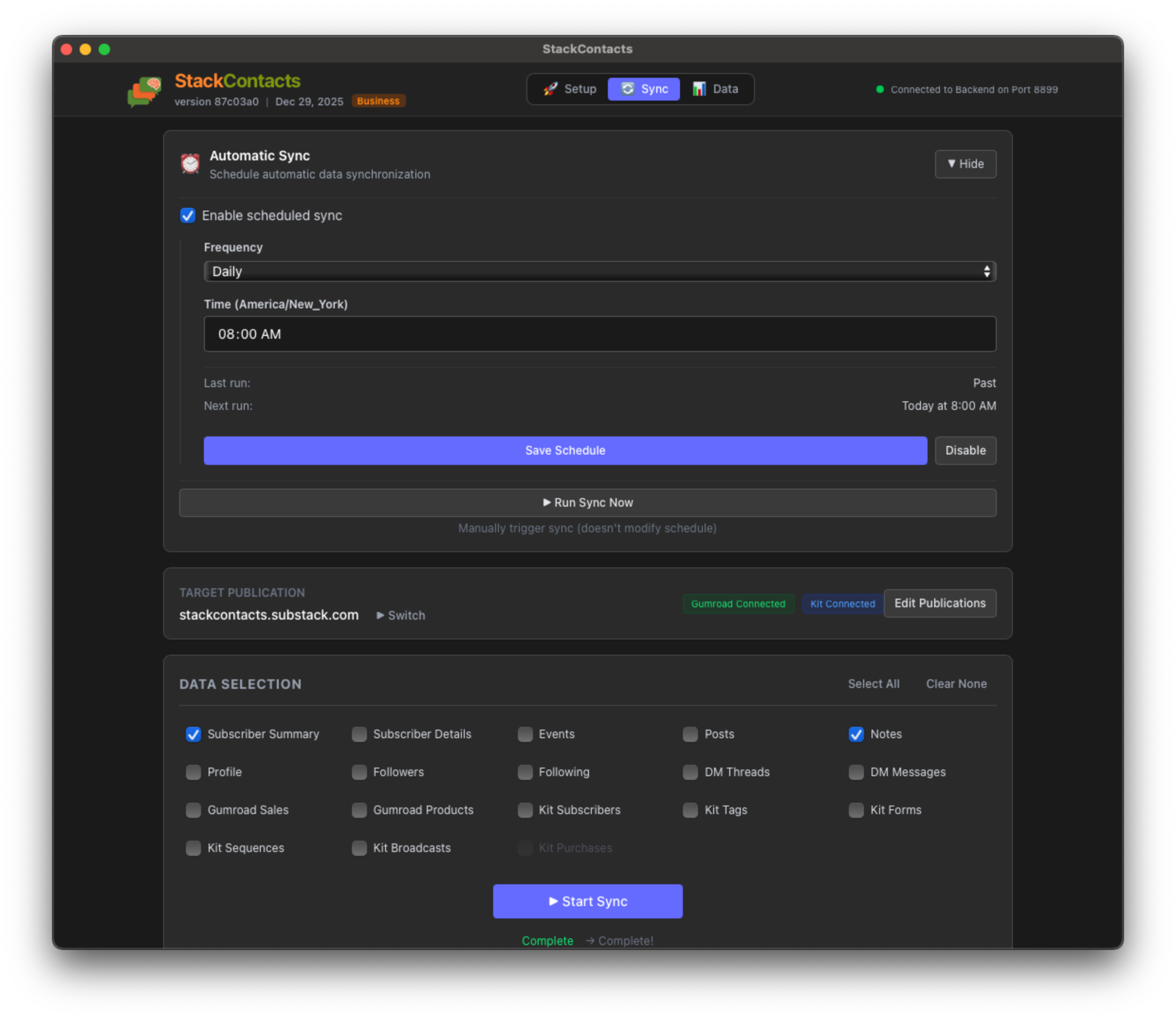
You need to run it at least once manually using “Run Sync now” to add the credentials to an internal database that tracks the scheduled jobs. Your selected publication is also stored there.
The UI shows the Next run, and if you want to stop automatic Sync, click the “Disable” button.
Just keep StackContacts running (it can run in the background), and your Subscriber Summary data will stay up to date.
If you want to verify it’s working, check the sync status in the app. You’ll see when the last sync completed and when the next one is scheduled.
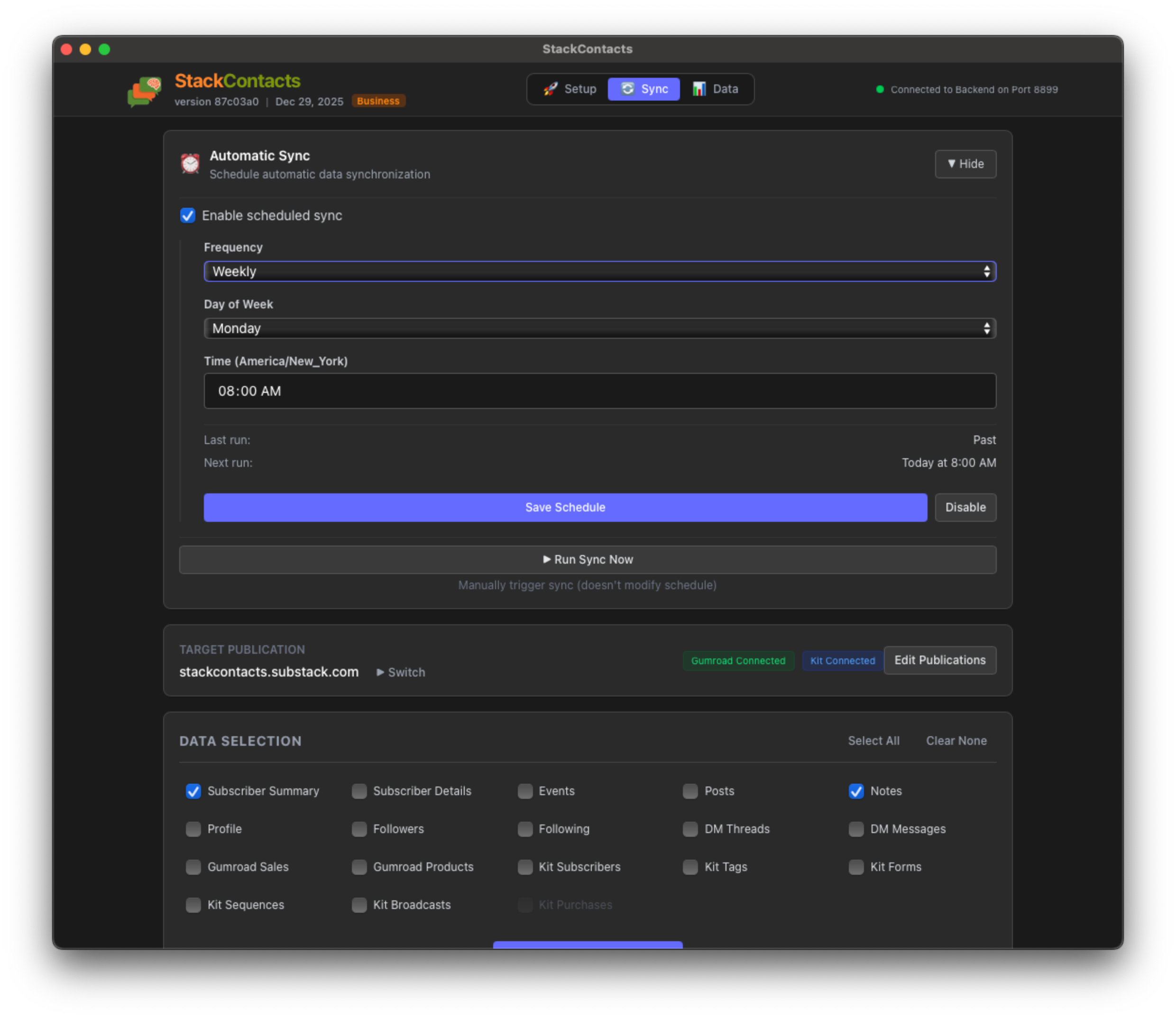
Here are the Weekly Frequency options. You can select the Day of Week - this helps you to get fresh data before your weekly review, for example.
Why This Matters
Fresh data means better insights. When your churn tracking analysis runs, it uses the latest subscriber data. When you’re looking for revenue attribution, you’re seeing the most recent sales. Automatic sync ensures you’re always working with current subscriber information.
This also sets the foundation for future features that need real-time data - like alerts when high-value subscribers disengage, or notifications when specific content drives sales.
We start this feature with Subscriber Summary data because it is critical to capturing churned subscribers and to adding other data sources in the future roadmap.
Feature #2: Subscriber Churn Tracking
What It Is
Churn tracking identifies subscribers who have left your publication by comparing historical snapshots of your subscriber base. It automatically creates a dated snapshot of all current subscribers every time you sync, building a historical record that lets you identify exactly when subscribers churn.
The feature uses two tables: subscribers_snapshots (append-only historical records) and subscriber_events (an engagement timeline with a merge mode to prevent duplicates). You can query these tables to analyze churn patterns and review engagement history for churned subscribers.
The Problem It Solves
Substack only shows you unsubscribes after they happen. By then, it’s too late—the subscriber is gone, and you’ve lost the opportunity to re-engage them or understand why they left.
With churn tracking, you can:
See exactly when subscribers churned by comparing snapshots across dates
Analyze engagement patterns for churned subscribers to identify warning signs
Track churn trends over time to spot patterns
Review the complete event history of churned subscribers (emails opened, posts seen, etc.)
How It Works
StackContacts maintains two tables to track subscribers:
subscribers_summary— Current subscribers (updated on each sync using merge mode)subscribers_snapshots— Historical snapshots (append-only, never deleted)
Automatic snapshot creation:
When you sync subscriber data (Subscriber Summary checked), the app automatically:
Updates
subscribers_summarywith your current subscriber listCreates a new snapshot in
subscribers_snapshotswith today’s date (YYYY-MM-DD format)Each snapshot record includes a
snapshot_datefield plus all subscriber data from that day
Key implementation details:
Primary key:
["snapshot_date", "subscription_id"]ensures one record per subscriber per dateWrite mode: Append-only (
write_disposition="append") preserves all historical snapshotsAutomatic: Snapshots are created automatically whenever you sync subscriber summary data
Event tracking: The
subscriber_eventstable uses merge mode to prevent duplicate events so that you can analyze engagement history for churned subscribers without table bloat
Finding churned subscribers:
Compare snapshots from different dates using SQL queries. A subscriber who appears in an older snapshot but not in a newer one has churned between those dates.
What You Can Do With It
Identify churn dates: Compare any two snapshot dates to see who churned in that period
Analyze churn patterns: Track churn rates over time, by subscription tier, or by other attributes
Review engagement history: Query
subscriber_eventsfor churned subscribers to see their last activities (emails opened, posts seen, etc.)Build retention reports: Calculate retention rates between snapshot dates
Segment analysis: Compare churn rates across different subscriber segments
Example Use Case
Scenario: You want to find subscribers who were active on December 15th but churned by December 22nd, and see what their engagement looked like before they left.
Step 1: Identify churned subscribers
-- Find subscribers who were active on Dec 15 but churned by Dec 22
USE pub_finntropy_substack_com;

SELECT
    old.subscription_id,
    old.user_email_address,
    old.subscription_interval,
    old.subscription_created_at
FROM subscribers_snapshots old
WHERE old.snapshot_date = '2025-12-15'
  AND NOT EXISTS (
    SELECT 1 FROM subscribers_snapshots new
    WHERE new.subscription_id = old.subscription_id
      AND new.snapshot_date = '2025-12-22'
  )
-- See the last 10 events for each churned subscriber
SELECT
    se.subscriber_email,
    se.text AS event_type,
    se.timestamp,
    se.post_title
FROM subscriber_events se
WHERE se.subscriber_email IN (
    -- Subquery from Step 1
    SELECT old.user_email_address
    FROM subscribers_snapshots old
    WHERE old.snapshot_date = '2025-12-15'
      AND NOT EXISTS (
        SELECT 1 FROM subscribers_snapshots new
        WHERE new.subscription_id = old.subscription_id
          AND new.snapshot_date = '2025-12-22'
      )
)
ORDER BY se.subscriber_email, se.timestamp DESC
LIMIT 10
This shows you exactly when subscribers churned and what their engagement looked like before they left, giving you insights to prevent future churn.
Bug Fixes: What We Fixed
Bug #1: Duplicate Subscriber Events Causing Database Bloat
What the bug was: Every time you synced subscriber events (like “Received email”, “Opened email”, “Post seen”), the app was adding all events to the database again, even if those events were already stored from a previous sync. This created duplicate rows for the same events.
How it affected users:
Your database grew much faster than it should have (we saw cases where the events table tripled in size)
Queries became slower as the table filled with duplicate data
Storage space was wasted on redundant information
It made it harder to analyze engagement patterns accurately
What we fixed: We changed the events table to use “merge” mode instead of “append” mode. Now, when the same event is synced again, it updates the existing record instead of creating a duplicate. Each event is uniquely identified by its timestamp, subscriber email, and event type, preventing duplicates.
How to verify it’s fixed: After syncing subscriber events multiple times, check your subscriber_events table. You should see approximately the same number of unique events even after numerous syncs, rather than the count growing rapidly each time. The table size should grow only at the rate of new events, not continuously multiplying in size.
Bug #2: Duplicate Direct Messages Causing Database Bloat
What the bug was: Similar to the events bug, every time you synced direct messages (DMs), the app was adding all messages to the database again, even if those messages were already stored from a previous sync. This created duplicate rows for the same messages.
How it affected users:
Your database grew unnecessarily large with duplicate message records
Queries on DM data became slower
Storage space was wasted
Made it challenging to track message history and conversations accurately
What we fixed: We changed the DM messages table to use “merge” mode instead of “append” mode. Now, when the same message is synced again, it updates the existing record instead of creating a duplicate. Each message is uniquely identified by its message ID (either from the API or generated from thread ID, timestamp, sender, and content).
How to verify it’s fixed: After syncing DM messages multiple times, check your dm_messages table. You should see roughly the same number of unique messages even after numerous syncs, rather than the count growing rapidly each time. The table size should grow only at the rate of new DMs, not continuously multiplying in size.
The Process
These bugs were found through my beta testing program. I’m grateful for everyone who took the time to report issues - it’s the only way StackContacts gets better.
Fixing bugs quickly matters. When something breaks, it breaks your workflow. That’s why I prioritize bug fixes and get them resolved as soon as possible.
If you find something that doesn’t work right, please report it. Your feedback directly shapes what gets fixed next.
Milestone: First Annual Paid Subscriber
The Story
Four days after launching this newsletter, I got my first annual paid subscriber.
That’s not just a number. That’s someone who saw value in what I’m building and committed to supporting it for a full year. That’s trust. That’s validation that this newsletter is worth paying for.
The Context
I launched this newsletter on Christmas Eve with a simple goal: help StackContacts users extract maximum value from their data. I didn’t know if anyone would pay for it. I didn’t know if the content would resonate.
Four days later, I had my answer.
Gratitude
To that first annual subscriber: Thank you!
Your support means more than you know. You’re not just a subscriber - you’re a co-builder. Your feedback, your questions, and your engagement shape what this newsletter becomes.
And to all the early supporters who signed up in those first days: Thank you for taking a chance on something new. You’re the foundation this community is built on.
What’s Next
This milestone isn’t an endpoint - it’s a starting point. It’s proof that there’s demand for deep, practical content about data-driven growth. It’s motivation to keep building, keep writing, keep helping creators see what their data is really telling them.
I’m committed to making this newsletter worth every dollar you invest in it. That means more weekly posts, more AI prompts, more case studies, and more ways to turn your StackContacts data into actionable insights.
If you’re reading this and haven’t upgraded yet, I’d love to have you join. You’ll get access to all the weekly analysis posts, the full AI prompt library, and direct support when you need it.
Announcement: Office Hours Starting Jan 7, 2026
What Are Office Hours
Starting January 7, 2026, I’ll be hosting weekly office hours for paid StackContacts subscribers. These are live calls where you can bring your questions, your data, and your challenges - and we’ll work through them together.
