

How I Track 974 Customers Better Than Any CRM I've Tried
AI does the data gathering. I do the relationship building.


I never meant to build a CRM. I was just trying to remember who my customers were.
But somewhere between the 50th and 159th person, my scattered notes became a system.
And that system became something I rely on more than any traditional CRM I’ve ever tried.
The Problem: Platforms Hide Your People
If you’re building products for creators—or really, any business where relationships matter—you’ve probably felt this frustration:
Substack tells you who subscribed, but not who they are beyond an email
Gumroad shows purchases, but not the conversation you had last week
Substack DMs are disconnected from everything else, like your Posts and Notes
Email feels like shouting into the void, with no memory of what resonated
Every platform gives you data, but none of them give you context. And context is what turns a subscriber into a relationship.
I needed a place to connect the dots. Not just “Emily bought my product,” but:
What does Emily actually do?
What feedback has she given?
When did she last engage?
What should I follow up on?
Traditional CRMs felt like overkill. I’m not managing a sales pipeline to close a deal - I’m trying to remember people like a human being.
So I built it differently.
Real-World Example: What This Actually Looks Like
Let me show you why this matters with a real customer story.
November 3, 2025 - Emily signs up for my newsletter
Reads the Substack Pro Studio guide 3 times
Purchases the product 5 hours later for $79
I create her person file, note the fast conversion
November 21, 2025 - She buys a second product ($25)
Update her file:
total_revenue: $104Tag her as
power_userNote: Multi-product buyers are rare, high-value
December 31, 2025 - She comments with a bug report
I copy her feedback into her timeline
Link to the development task to fix it
Add to recommended actions: “Reply and thank her”
January 6, 2026 - I review her file for this article
See she’s been active, but no direct DM yet
Notice she runs her own Substack on trauma healing
Today - Emily comments on my post. I open her file. Saw she’d been a customer for over two months, gave great feedback on scheduling features, and mentioned struggling with subscriber churn.
I replied with a specific answer about churn tracking—because I remembered.
Without this system, Emily is just “another customer who bought something.”
With it, she’s:
A power user who converts fast ($104 in 18 days)
A feedback provider improving my products
A potential collaborator with an aligned audience
Someone I need personally to reach out to
That’s the difference between data and context.
The Secret: I Don’t Do This Manually
Here’s where it gets interesting.
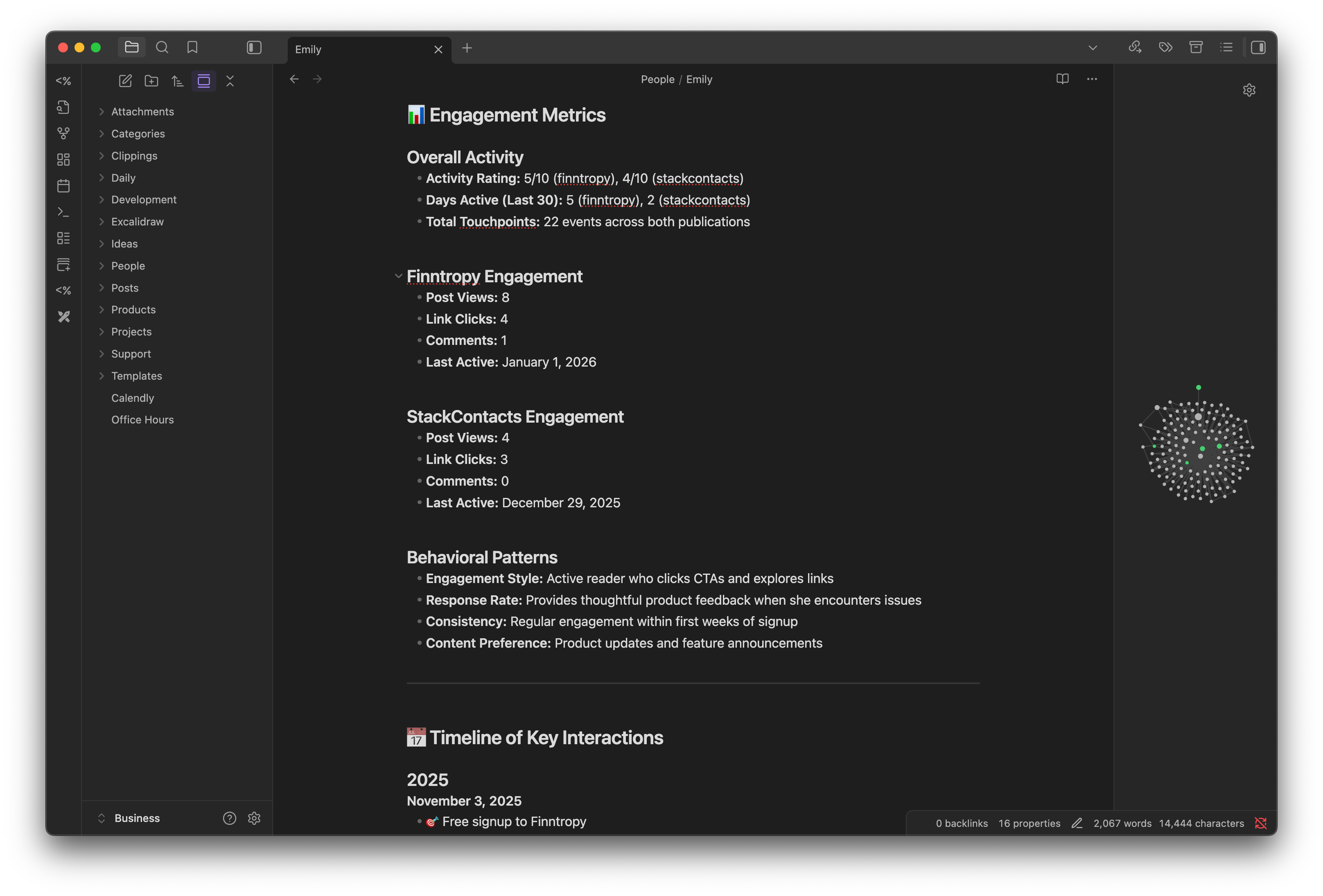
I don’t manually write Emily’s 405-line dossier by hand. That would be insane.
Instead, I use the Cursor app (an AI code editor) to automatically generate and update markdown files by querying my StackContacts database.
How It Works
I type a slash command: /subscriber_analysis_prompt Emily
30 seconds later, I have:
Full profile with membership status and revenue
Complete timeline of all 22 engagement events
Exact text of her bug report DM
Her publication details and bio
Purchase history with order IDs
Recommended next actions
Everything formatted in markdown, ready to use
Before (manual copy/paste hell):
Open Substack, find Emily’s email
Check the subscriber dashboard for event activity
Go to Gumroad, search for purchases
Check my DMs for conversations
Go to the comments section, search for her comments
Copy/paste everything into a note
Try to remember what I wanted to follow up on
Give up halfway through because it takes an hour
After (Cursor + StackContacts):
/subscriber_analysis_prompt Emily
Done. 30 seconds.
It’s Not Just People—It’s Everything
I have three slash commands for three types of business intelligence:
1. /subscriber_analysis_prompt - People analytics
Queries 15+ database tables
Analyzes subscriber details, events, comments, DMs, and purchases
Generates comprehensive relationship profiles
Example: Emily’s 405-line customer dossier
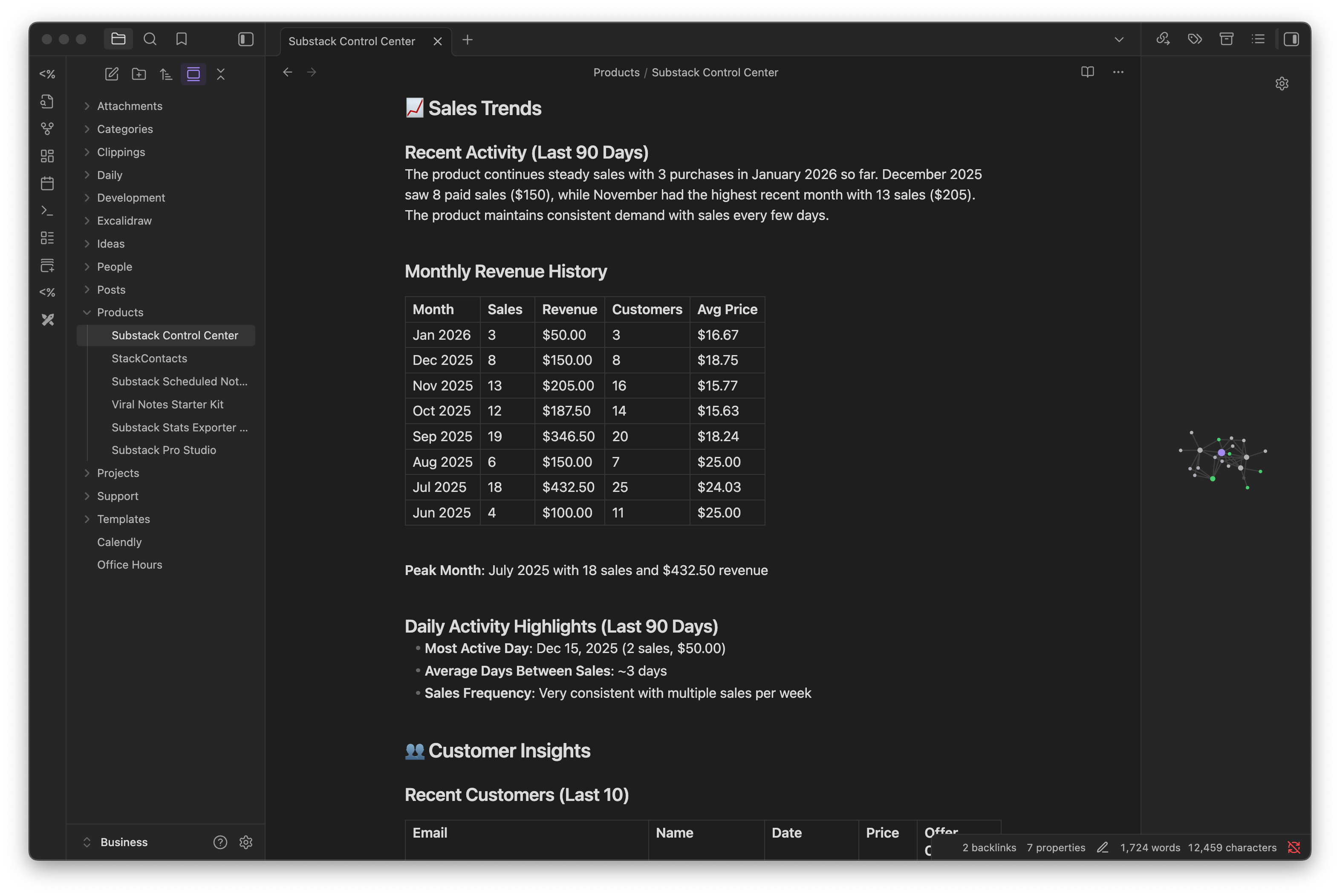
2. /update_product_metrics - Product analytics
Reads Gumroad sales data
Calculates revenue, trends, and customer metrics
Updates product files with formatted tables
Example output:
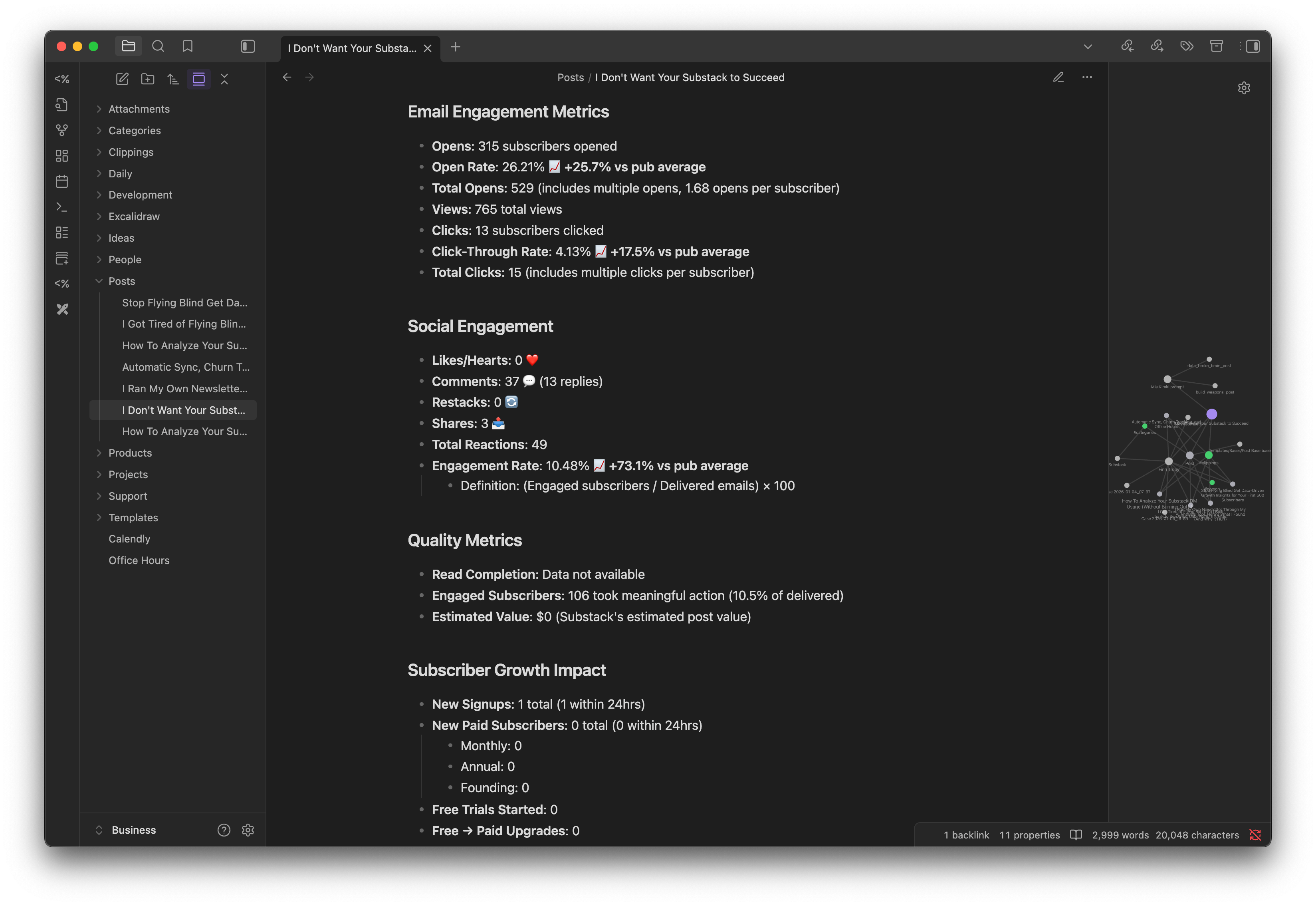
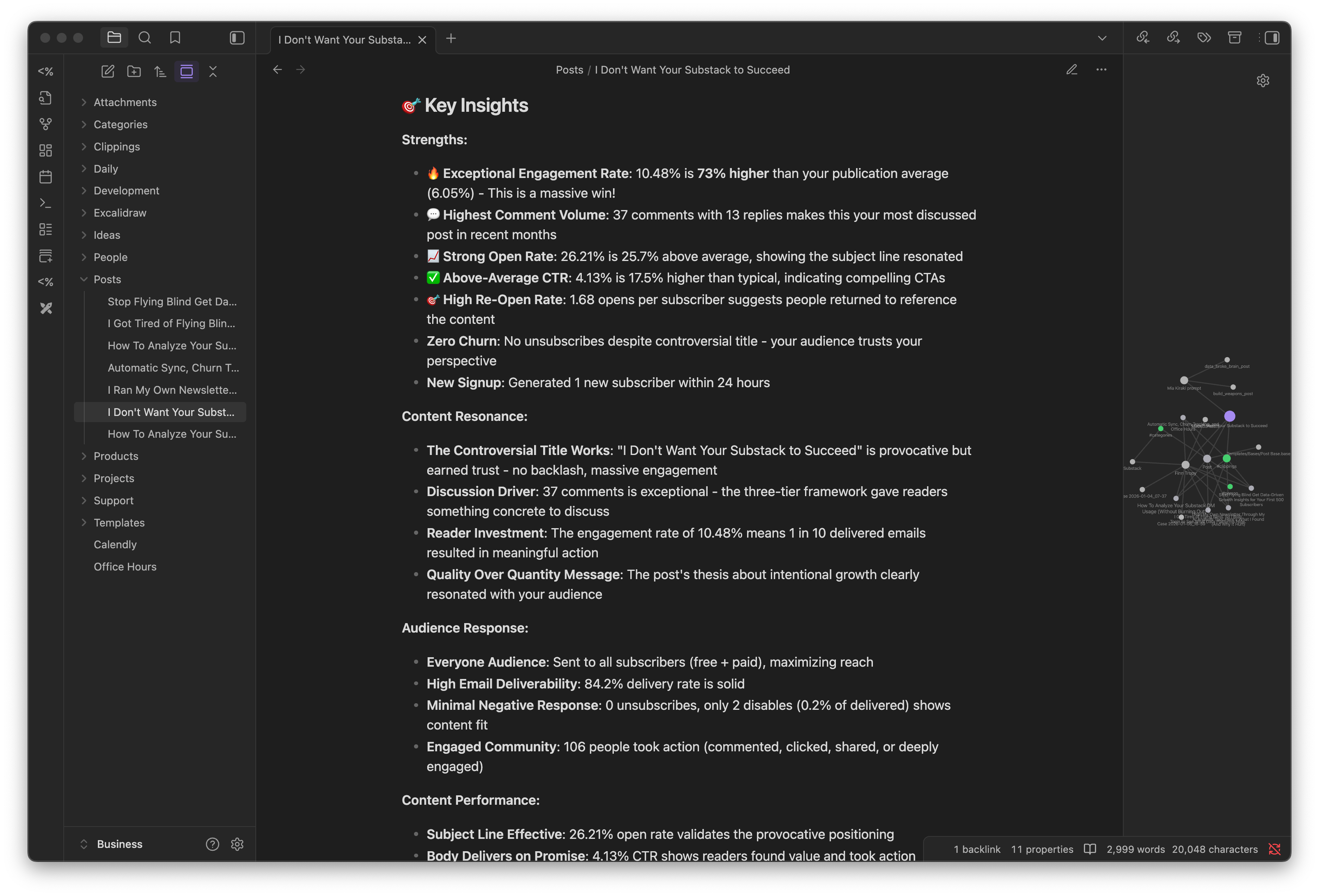
3. /update_post_data - Content performance
Queries Substack post metrics
Analyzes engagement, open rates, conversions
Compares to publication benchmarks
Example outputs:
So I have three parallel systems:
People tracking: Deep relationship context
Product tracking: Revenue and sales analytics
Post tracking: Content performance and audience response
All living in markdown files. All updated on demand with a slash command.
In 30 seconds.
Why This Changes Everything
This isn’t just “automation.” It’s augmented memory.
The AI handles data gathering (the tedious part):
Querying multiple database tables
Correlating events across platforms
Calculating metrics and timelines
Finding patterns in engagement data
I handle relationship building (the human part):
Reading the context and adding my observations
Deciding who to reach out to and why
Crafting personalized messages
Responding to DMs and comments
Updating the file with new interactions
The markdown file becomes a collaboration space between:
The AI’s perfect memory of data
My human judgment about relationships
The Real Power: Query Anything Instantly
I can ask Cursor AI questions like:
People queries:
“Who are my top 10 customers by revenue?”
“Show me everyone who commented but never bought anything.”
“Find people who signed up in November and went silent.”
“Who mentioned ‘churn’ in a DM or comment?”
Product queries:
“Update all product metrics for January.”
“Which product has the highest revenue per customer?”
“Show me products with declining sales trends.”
“Compare performance across all 6 products.”
Post queries:
“Update metrics for my last 5 posts.”
“Which posts have the highest engagement rates?”
“Show me posts that drove paid conversions.”
“Find posts with high open rates but low read completion.”
Cross-entity queries:
“Find customers who bought multiple products.”
“Which people should I reach out to this week?”
“Show me high-value customers with recent engagement.”
“Create a project file for the next product launch.”
It queries the database, analyzes results, and either:
Updates existing people/product/post/support files with insights
Generates summary lists with recommendations
Creates new project files with follow-up actions
Writes comparative analysis across entities
It’s like having a junior data analyst who never sleeps and has perfect recall.
Why Obsidian + Markdown, Not a Real CRM?
I’ve tried “proper” CRMs. Notion databases, Airtable, TwentyCRM, Odoo, and even custom spreadsheets.
They all failed because they optimized for capture over recall.
Here’s why this system works:
1. It’s Where I Already Think
I don’t have to “go into the CRM.”
I’m already writing daily notes, logging ideas, and planning projects. People just live in the same space where I do my daily work.
2. Markdown is Portable
All my relationship data is just text files. If the Obsidian app dies tomorrow, I still have my markdown files that work in any text editor.
3. Links Create Memory
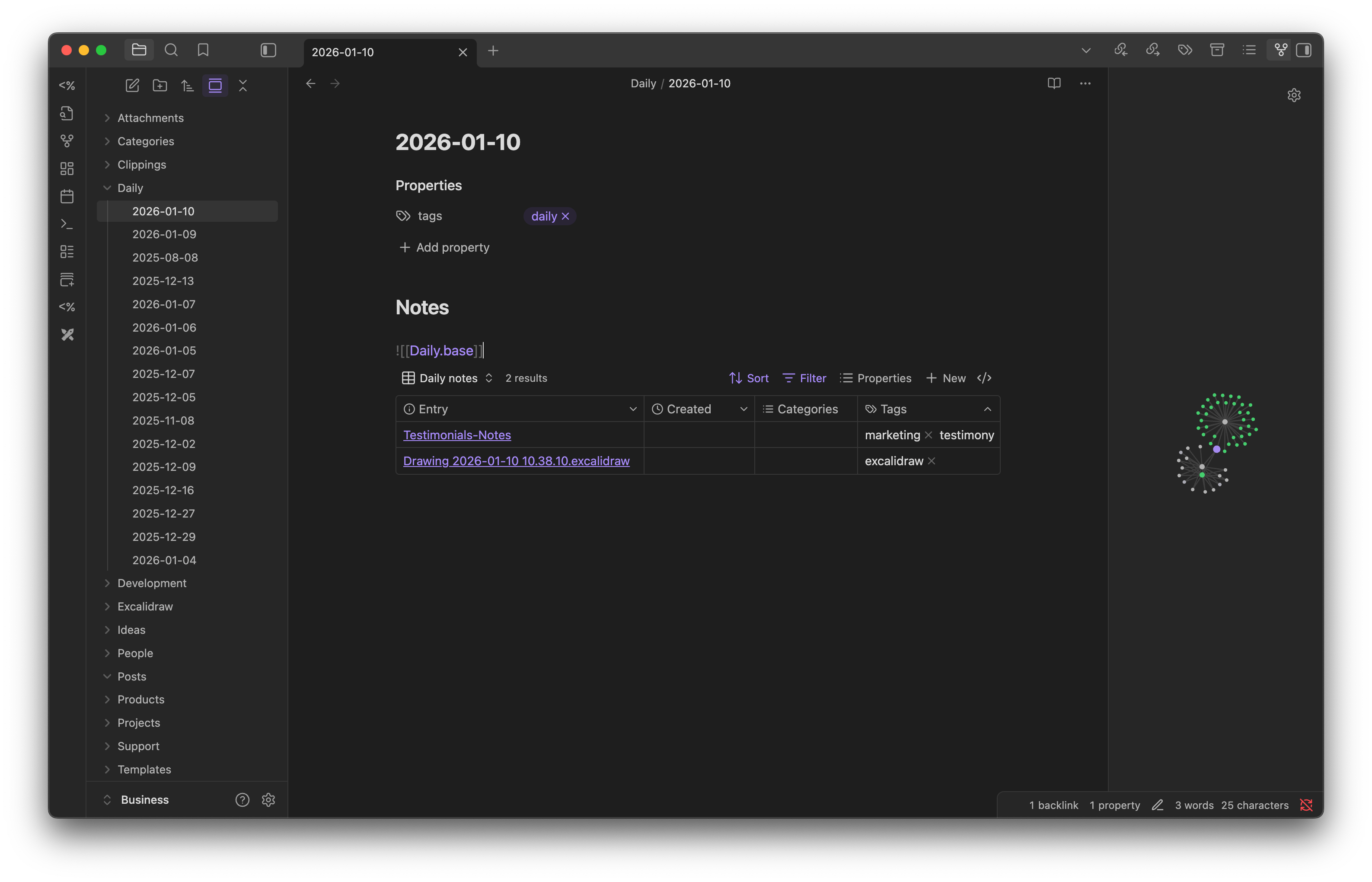
Traditional CRMs have “related records.” Obsidian has bidirectional links that show context everywhere. It’s not a feature—it’s how the whole system works.
When I mention Emily in a daily note, it automatically appears on her timeline. When she comments on a product, it’s linked in both her file and the product file. Write it once, see it everywhere it matters.
I can navigate through links, instead of spending time searching for what I don’t fully remember.
4. Friction is Near-Zero
Creating a new person takes 5 seconds. Updating a note takes 2 seconds.
If your CRM has loading spinners, you’ve already lost.
5. It Scales with Complexity
Early on, person files were simple.
Now they have executive summaries, commercial analysis, collaboration potential, and recommended actions. The system evolved naturally because it’s just... notes.
6. AI Integration is Native
Cursor AI can read and write local markdown files directly.
No export/import steps. Super fast. Secure.
The AI assistant works with the same files I work with. It updates them from Substack, Gumroad, and Kit data in a few seconds. Subscriber details, events, DMs, posts, comments, products, sales, etc.
The Meta-Irony
I built StackContacts (a CRM for Substack creators) to help people track their subscribers.
But I use an Obsidian vault + Cursor AI to sync my subscribers from StackContacts.
The CRM builder uses a note-taking app to remember his customers.
Why? Because:
My vault evolves faster - I can add fields/sections instantly
Markdown is more flexible - I can embed diagrams, add context, and add bi-directional links freely
AI integration is seamless - Cursor AI can read/write markdown natively
It’s all local - Super fast updates, complete control, I own all my data on my computer.
What I’ve Learned Running This for 2+ Months
It Forces You to Pay Attention
When you write “Emily left a 5-star review and bought a second product,” you notice that. You don’t just see a conversion metric—you see a person who trusts your work.
Patterns Emerge from Notes
I didn’t plan to identify “fast converters” or “multi-product buyers.” But when you review 10 unique person files, you start seeing patterns. Their DMs, comments, and questions.
Those patterns inform product strategy. And Gumroad upsell messages. And the next piece of content to write.
Context Compounds Over Time
The first interaction is just data. The tenth interaction is a story. The twentieth is a relationship.
Obsidian captures all of it in one place. StackContacts syncs data from the source, and AI updates your markdown files.
It’s Only As Good As Your Discipline
This system requires writing things down. If you don’t care about your interactions with people, you lose the value. But if you do it consistently, the compound interest is massive.
But here’s the thing: with AI automation handling the data gathering, the “discipline” part becomes way easier. I just need to add my human observations to what the AI already compiled.
Who This System Is For (And Who It Isn’t)
This works if you:
Manage 20 -1,000 human relationships (past that, automation matters more)
Sell products or services where context matters more than volume
Value deep relationships over conversion funnels
Want perfect memory without manual data entry
Willing to set up the technical foundation once
This doesn’t work if you:
Need fully automated sales pipelines and email sequences
Manage tens of thousands of transactional customers
Want visual dashboards and corporate style reporting
Need team collaboration (Obsidian is local-first, not cloud-based)
Don’t have queryable data sources
It’s not for everyone.
But if you’re a solo founder, creator, or consultant trying to remember people better than platforms remember them, this system might change how you work.
How the System Actually Works (The Technical Part)
Okay, now for the details. If you want to build something like this, here’s what’s under the hood:
