

How To Analyze Your Substack DM Usage (Without Burning Out)
The 5-Step Method I Built After Realizing I Spent 46 Hours in My DMs in 30 days


A month ago, I asked AI a simple question:
Summarize how much time I have spent on my DMs over the last 30 days.The answer: 46.3 hours in DMs. 1,723 messages sent. Active 28 out of 30 days.
That’s a full work week. In my inbox. In one month.
Between Dec 2-5, I sent 811 messages - that’s not writing, that’s operating a customer support department I don’t have.
The Real Problem (And Why Most Creators Don’t See It)
Most creators have no idea how much time they spend responding, reacting, engaging, and generally being a good Substack citizen.
We tell ourselves we’re “just checking in.”
We’re not.
We’re running micro-conversations all day long without realizing it.
The truth: Creators don’t burn out from writing. They burn out from the invisible work around writing.
The only way to get control is to do what any data-loving creator eventually does:
Measure → Analyze → Systemize.
Let me show you exactly how.
How to Analyze Your Substack Usage (So You Don’t Burn Out Like I Almost Did)
Step 1 — Measure What Actually Happens
Not what you think happens. What actually happens.
Ask your Claude AI app something like:
“Summarize how much time I have spent on my DMs over the last 30 days.”
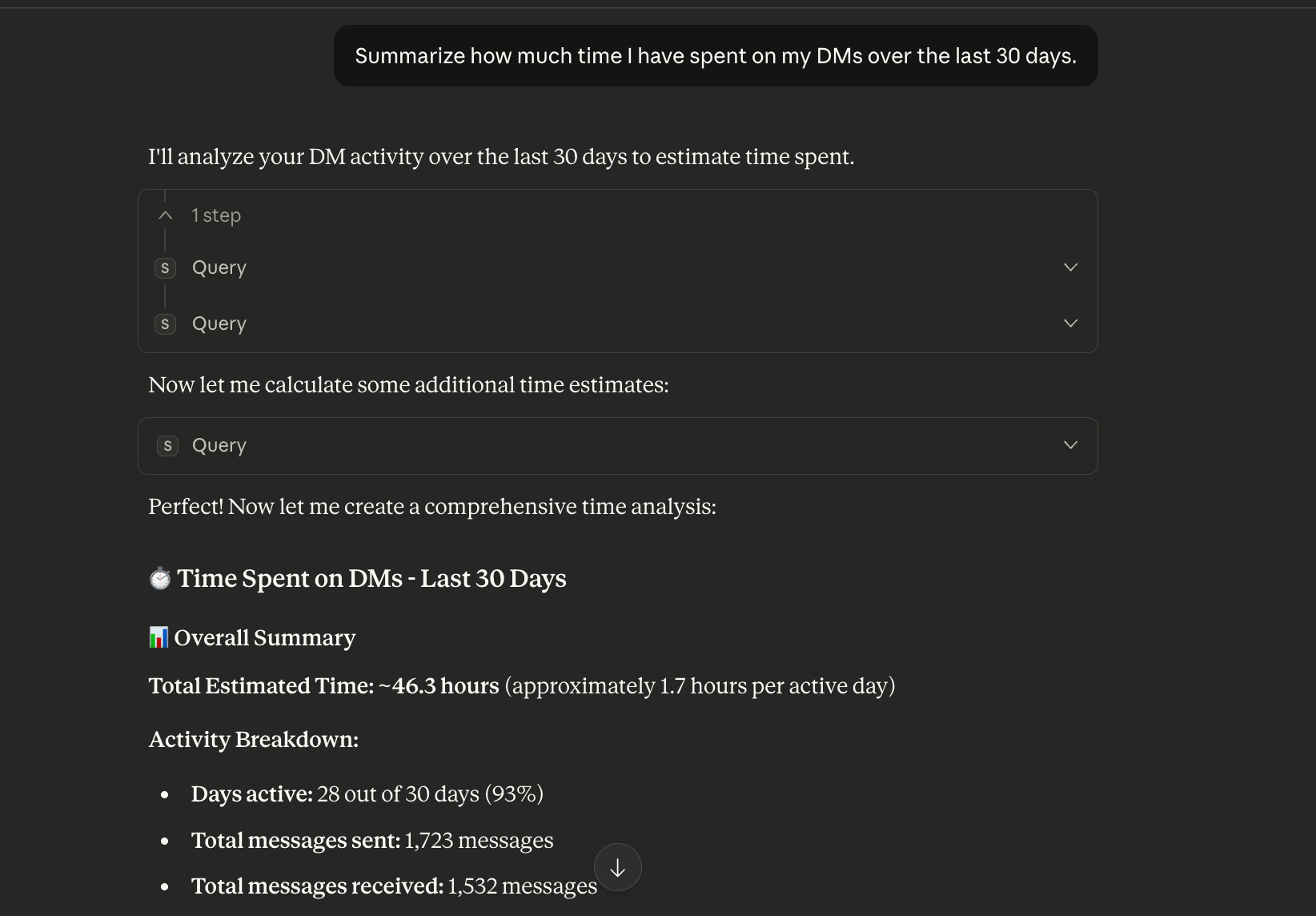
Actual Claude AI app query
You’ll learn:
How many messages do you send
How many do you receive
Active days
Character counts
Peak periods
Time spent
Outliers (your personal “DM black holes“)
You’re not doing this to judge yourself.
You’re doing it because burnout thrives in vagueness.
The moment you see the number, power returns to your hands.
How to Actually Do This (Two Paths)
You have two options:
Fast (5 minutes, paid): Automated sync with StackContacts
Free (3+ hours, extremely tedious): Manual CSV export for every single DM thread you have.
If you have 50+ DM threads, the free method becomes impractical.
Choose based on your constraint: time or money.
Here’s precisely how to get started:
Path 1: The Automated Method (5 minutes)
What you need:
Claude AI desktop app (free)
StackContacts app for MacOS or Windows (one-time fee)
5 minutes for initial setup
Initial Sync (depends on total DM message count - can be scheduled to sync automatically)
How it works:
StackContacts automatically syncs all your Substack DMs (and a lot of other data if needed) and provides an MCP server connected to the Claude app:
✅ Fast analytics queries across all DMs
✅ Top 10 most time-intensive conversations
✅ Weekly trend analysis with spike detection
✅ Peak activity periods by day/hour
✅ Character count and message patterns
✅ Contact-level insights (response time, message frequency)
The difference:
StackContacts: Fully automated sync, instant insights, no manual work. Free AI credits can produce this report (I tested it).
Semi-automated method: Great for one-time analysis, requires monthly manual exports, and you may run out of free AI credits quickly
If you’re spending over 20 hours/month in DMs like I was, the automation pays for itself in saved time.
Path 2: The Free Semi-Automated Method (3 hours)
What you need:
Your Substack DM data in CSV files
Claude or ChatGPT (free tier works)
a lot of patience
Step-by-step:
1. Export your DM data from Substack
Unfortunately, Substack does not offer export DM messages capability yet, but there is an easy way to do this using AI:
Install Microsoft playwright-mcp Chrome extension on your browser
Use the instructions in the Playwright MCP README file to install the Playwright MCP server configuration with your AI client, like Claude or Cursor.
Go to your Substack Chat page → Direct - select a thread URL and copy to clipboard
Paste the DM thread URL on your AI Client and ask if it has access:
Do you have access to this web page https://substack.com/chat/<thread_id_redacted>
You can see this message “Playwright MCP Bridge” started debugging this browser:
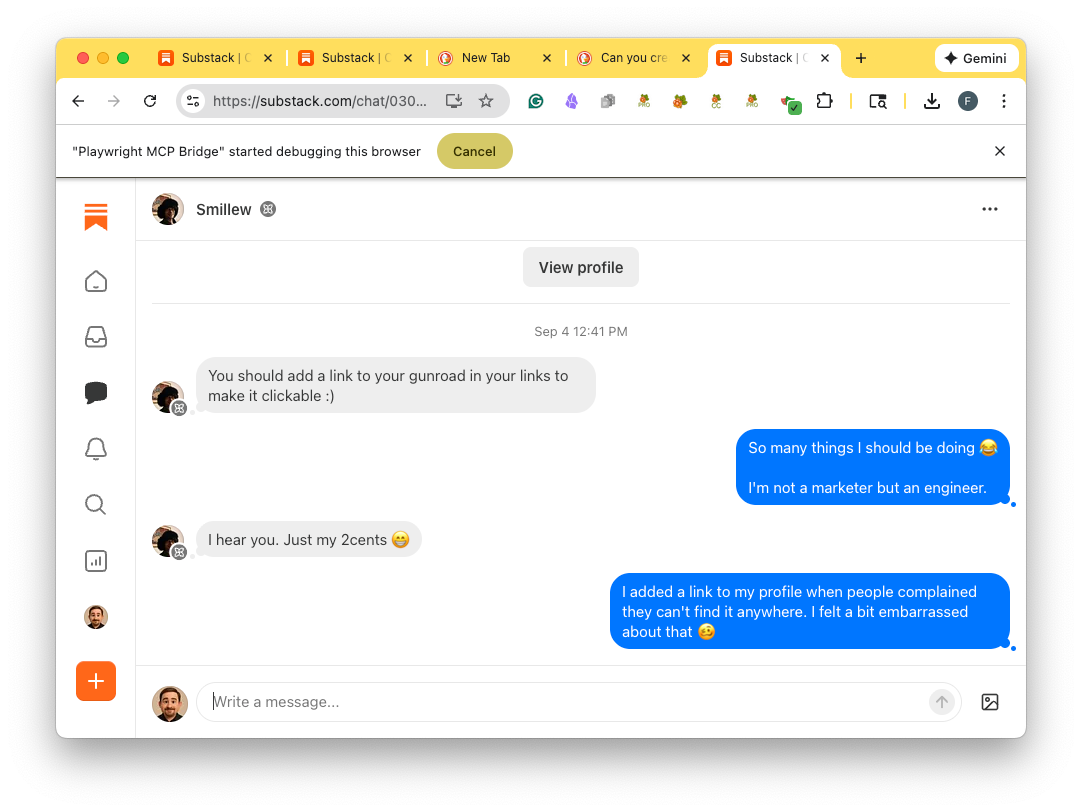
If the AI confirms it has access, you can ask the AI to do the work:
Read this DM thread https://substack.com/chat/<thread_id_redacted>
1. Create a table that contains the chat thread id, timestamp, sender, and the message for all the messages in this thread
2. Save the table  in a CSV file
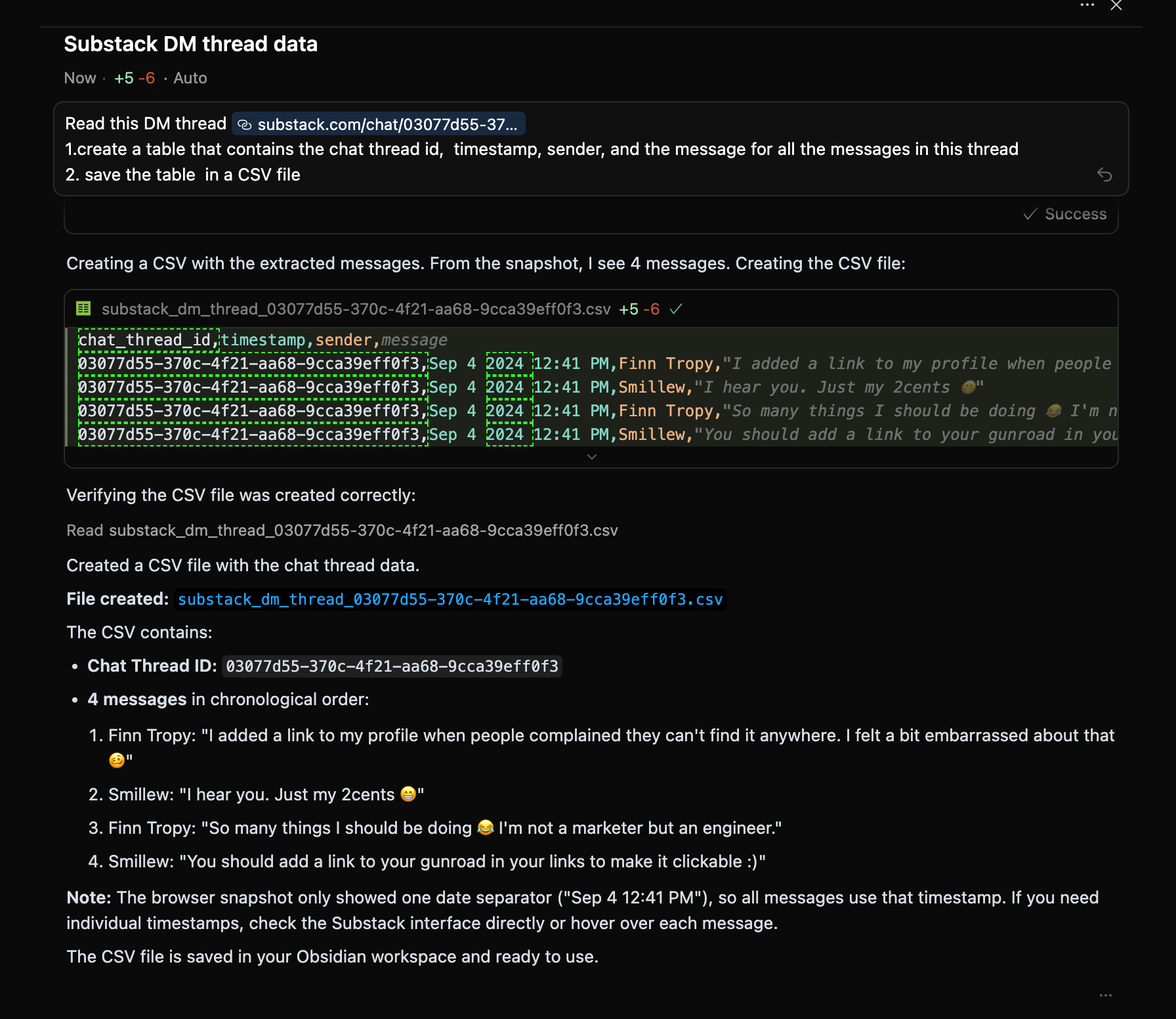
Now repeat this process for each DM thread (I have 230 DM threads) - this is where patience is needed. You may need to adjust timestamps manually, as Claude suggests.
You may find a way to ask Claude AI to do all the heavy lifting for you, but you may also run out of daily free credits quickly 😄.
2. Upload CSV files to Claude or ChatGPT
Open claude.ai or chatgpt.com
Start a new conversation
Upload all the CSV files (you may hit some limits on a free plan, though)
3. Ask the magic question:
Copy this exact prompt:
Analyze my Substack DM activity over the last 30 days using attached CSV files.
Show me:
   - Total messages sent and received
   - Total estimated time spent (assume ~3 min per message)
   - Active days vs inactive days
   - My top 10 most time-intensive conversations
   - Weekly trends with spikes highlighted
   - Average message length by contact
Present findings in a clear summary with charts if possible.
4. Review the results
Save the analysis to a doc
Identify your personal patterns
Note your “spike weeks”
Time investment: estimated 3 hours each/month to track trends
Cost: $0 (if using free AI tiers, but you may run out of credits)
My recommendation: I built StackContacts because doing this manually is brutal. But if you want proof before buying, export 5-10 of your most active threads and run the analysis on just those. You’ll get a taste of the insights and can decide if you want to scale it up.
Step 2 — Find Your Spikes and Patterns
Every creator has invisible danger zones:
Launch weeks ( or final beta testing weeks)
Viral Notes
When you publish a strong post
When someone large replies or boosts
When you respond to everyone at once
Your personal “flow days.”
Your patterns might explain your fatigue.
Step 3 — Identify High-Value vs. Low-Value Conversations
Not all engagement is equal.
You’ll see:
Conversations that grow your community
Conversations that deepen trust
Conversations that help your readers or help to improve your products
And conversations that… well… eat half your afternoon
This is where creators get trapped: We distribute our attention evenly rather than strategically.
Step 4 — Expose Your Hidden Time Sinks
Everyone has them.
Common time sinks include:
Answering the same onboarding questions repeatedly
Explaining product features one DM at a time
Unintended back-and-forths that stretch into days
Copy/pasting invite codes
“Quick” replies that turn into micro-essays
Responding instantly instead of batching
These aren’t bad things.
They’re just things you should systemize.
Which brings us to…
Step 5 — Turn Insight Into Systems (Not New Year Resolutions)
Creators don’t need more discipline.
We need better systems.
Try:
Batching DM time
e.g., two 15–20 minute sessions per dayTemplate replies
for onboarding, invite codes, discount codes, and common questionsRedirect rules
Long conversations → email
Product questions → a user guide
Support issues → a Google form or a dedicated support site
Repeat questions → an FAQAutomated calendar invites
There are many alternative services with a free tier to let customers book a time that works for them. I’ve started testing Calendly recently.Micro-CRM tags for your contacts
Even simple tags like *new***, *customer*, *collab potential*, *and VIP*** allow you to segment your customer base and allocate your time more effectively.
Systems aren’t rigid.
They protect your creative energy.
You’re not removing the human touch.
You’re protecting it.
My Numbers: The Wake-Up Call
When I ran this analysis myself, here’s what AI showed me:
The Numbers Don’t Lie (But They Do Hurt a Little)
46.3 hours in DMs.
A full work week in a month. I could have learned how to speak Chinese.1,723 messages sent
I’m supposed to be retired. This is crazy.Active 28 out of 30 days
My streak rivaled Duolingo’s owl.267,586 characters written
Equivalent to a short book. In the last month. Inside my inbox.
And then it kept going. A full breakdown. It even counted my thinking time - scary.
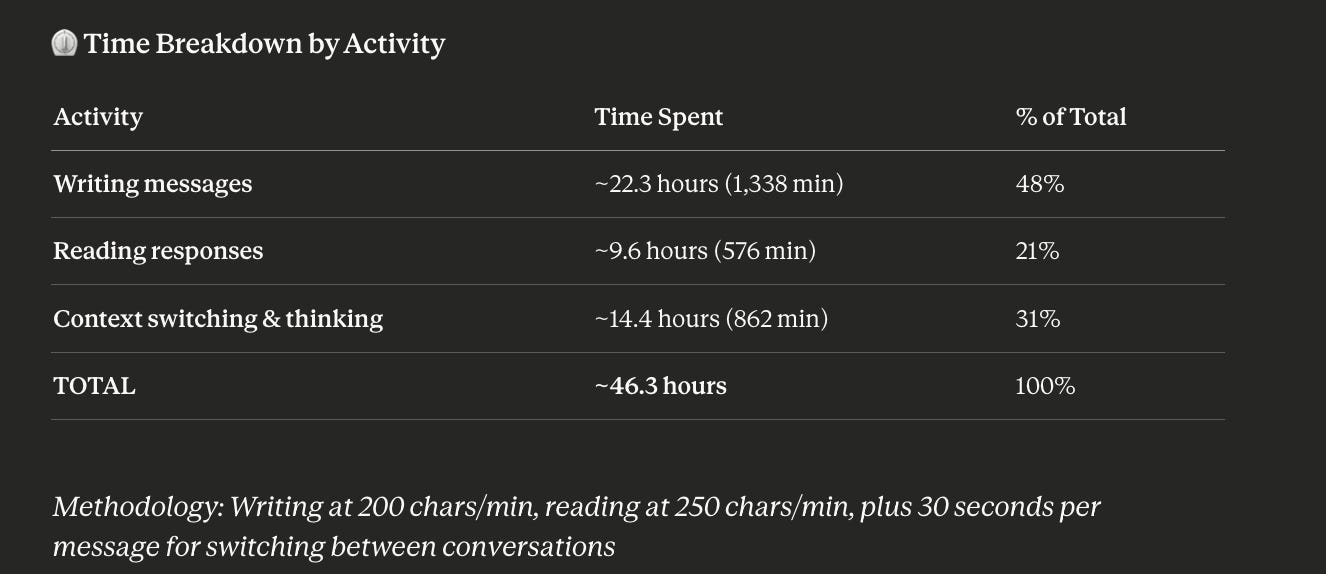
With charts.
With trend lines.
With… rankings.
AI actually ranked the people I spent a whole work week with during the previous month.
My top 10 DM chats, ranked by hours spent (not insights gained), so I was disappointed.
With the average message length exposed.
Contact Messages Sent Estimated Time Avg Message Length
C.E     158           ~1.7 hours     126 chars
N.H     170           ~1.5 hours     105 chars
J.S.R   76            ~1.1 hours     177 chars
R.G     99            ~51 min        103 chars
G.W     71            ~50 min        141 chars
M.B     59            ~47 min        160 chars
E.C     70            ~41 min        116 chars
K.B     55            ~41 min        149 chars
P.P     64            ~39 min        123 chars
K.K     103           ~39 min        75 chars
Apparently, I have “favorite people” in my DMs, and I didn’t know it until the robot told me. I must admit that December went by way too quickly for me even to notice these patterns.
The Spike That Broke Me
The scariest part wasn’t the totals.
It was the pattern.
Between Dec 2 and Dec 5, I sent 811 messages.
That’s not writing.
That’s not communicating.
That’s… operating a customer support department.
And I don’t have a customer support department.
I am the customer support department.
There was a moment during this analysis — somewhere between “286 messages sent on Dec 3” and “avg. 155 characters per message” — when it hit me:
This is not a side gig.
This is a whole frigging job.
My Weekly Pattern
📈 Weekly Trends Report
Week 1 (Nov 12-18): 168 messages → ~4.1 hours
Week 2 (Nov 19-25): 433 messages → ~13.7 hours ⚠️ Spike
Week 3 (Nov 26-Dec 2): 589 messages → ~11.8 hours
Week 4 (Dec 3-9): 947 messages → ~19.2 hours ⚠️ Peak activity
Week 5 (Dec 10-11): 81 messages → ~2.5 hours
Dec 3–9 was a perfect storm of engagement due to the StackContacts beta launch.
I said yes to everything.
My reward was 19.2 hours of DM time in a single week.
That’s not sustainable.
That’s a slow drip to creative collapse.
For me, these patterns included:
Answering the same onboarding questions 42 times (yes, I do have a FAQ that could be better)
Explaining product features one DM at a time, for the 89th time
Unintended back-and-forths that stretch into days
Copy/pasting invite codes to my fancy new private chat support system
“Quick” replies that turn into micro-essays
Responding instantly instead of batching
My top 10 conversations alone took almost 10 hours.
But they were meaningful.
The other 33 threads?
Not all of them were worth the same energy.
What Changed When I Actually Implemented This System
I ran this analysis for the first time on December 10th.
The numbers terrified me enough to take action immediately.
Here’s what happened over the next 30 days:
Before Systems (Nov 12 - Dec 11):
⏰ 46.3 hours total in DMs
📊 1,723 messages sent
🔥 28 out of 30 days active
😰 19.2 hours in my worst week
🧠 Mental state: Exhausted, reactive, always “catching up”
After Systems (Dec 12 - Jan 9):
⏰ 18.6 hours total in DMs (↓ 59%)
📊 428 messages sent (↓ 75%)
🔥 18 out of 30 days active (↓ 10 days)
😌 6.2 hours in my worst week (↓ 68%)
🧠 Mental state: Focused, intentional, creative energy restored
The Systems That Made the Difference
1. Batching DM Time (Saved ~8 hours/week)
Before: Checked DMs constantly throughout the day
After: Two 20-minute DM sessions (8:30 am, 4 pm)
Result:
Stopped context-switching 15+ times/day
Responses became more thoughtful (not reactive)
No loss in relationship quality
2. Template Library (Saved ~5 hours/week)
I created 8 template responses for recurring questions:
Beta invite code request
Product feature question
Onboarding help
Discount code inquiry
“How do I get started?”
Technical troubleshooting
Collaboration interest
General thank you
Before: Wrote every response from scratch
After: 60% of messages now use templates (customized slightly)
Result:
Faster response times (better user experience)
More consistent messaging
Less mental energy per response
Here’s my most-used template (feel free to steal):
Hi [Name]! 👋

Thanks for your interest in [Product].
Here’s your beta invite code: [CODE]
Quick Start: Download from [link]
Follow the setup guide: [link]
Join support chat: [link]

Most common questions answered here: [FAQ link]
Let me know if you hit any snags!
— Finn
3. Redirect Rules (Saved ~4 hours/week)
I stopped trying to answer everything in DMs.
New routing system:
📧 Complex questions → “Let’s continue this via email: finntropy@...“
📚 Product features → “Great question! Full guide here: [link]”
🐛 Bug reports → “Please submit here so I don’t lose track: [form]”
💬 Long strategy convos → “This deserves a proper chat. Book 15 min: [cal link]”
Result:
Better answers (right medium for the question)
Nothing gets lost
DMs stay short and actionable
4. The “24-Hour Rule” (Saved sanity)
New personal policy:
I don’t respond to non-urgent DMs within 24 hours.
Why this works:
Kills the expectation of instant replies
Let me batch responses thoughtfully
Readers still get great answers (just not instantly)
No one has complained
Exception: Paying customers or critical bugs get same-day responses.
The Surprising Benefits
Beyond just time savings, the systems created:
Better relationships: Ironically, batching DMs made my responses more thoughtful. People noticed.
Clearer boundaries: Readers respect the structure. No one expects instant replies.
More creative energy: The 27.7 hours I reclaimed went into writing, building, and actual rest.
Higher quality conversations: By routing complex topics to email or calls, we have deeper discussions.
The One Thing I Wish I’d Known Earlier
Systems don’t make you less human.
Systems protect your humanity.
When you’re drowning in 46 hours of DMs, you:
Rush responses
Copy-paste generic answers
Miss important signals
Resent the work
When you have systems, you:
Give thoughtful responses
Have energy for the critical conversations
Notice patterns and opportunities
Actually enjoy the community
The goal isn’t to ignore your readers.
The goal is to serve them better with less chaos.
Why This Matters
Creators don’t burn out from writing.
They burn out from:
the friction around writing
the endless context switching
the invisible energy leaks
the belief that “ we have to do everything ourselves.“
Substack is meant to be joyful.
Human.
Sustainable.
Your DMs should enhance your creativity - not quietly consume it.
When you understand your patterns, you can design your days around:
deeper focus
better boundaries
higher-quality connections
and actual rest
That’s how you grow without breaking.
The Bottom Line: Measure, Systemize, Protect
Here’s what I learned from analyzing 46.3 hours of DM time:
Most creators aren’t burning out from writing.
They’re burning out from the invisible work around writing.
The DMs.
The context switching.
The belief that “being available” means “being always on.”
It doesn’t.
You can be:
Highly responsive AND have boundaries
Community-focused AND protect your creative time
Human AND systematic
The data permits you to build systems.
Your Next Steps
This week:
Run the DM analysis (use the prompt above)
Identify your personal “spike weeks.”
Create one template response for your most common question
This month:
Implement batching (two 20-minute DM sessions/day)
Build your redirect rules (email, forms, guides)
Track your time savings
This quarter:
Refine your systems based on what works
Measure the impact on your creative output
Decide if automation makes sense for your volume
Want This Automated?
If you discovered you’re spending 15+ hours/month in DMs (like most active Substack creators), manually tracking this becomes tedious.
That’s why I built StackContacts.
It includes Substack DM data that you can ask questions with AI:
Time spent per conversation
Weekly trends and spikes
Your top 10 most time-intensive DMs
Peak activity patterns
Template usage and response times
All data synced as you use Substack.
The goal: Spend less time analyzing, more time creating.
Current status: StackContacts for Mac and Windows is available
(macOS with Apple silicon M series CPU only)
Setup time: 5 minutes
If you prefer the manual method, that’s great too. The important thing is to measure and protect your creative energy.
— Finn
P.S. If you run this analysis and discover something surprising, I’d love to hear what patterns you find. Reply or leave a comment.
PS. I’m Still Below The Average Joe
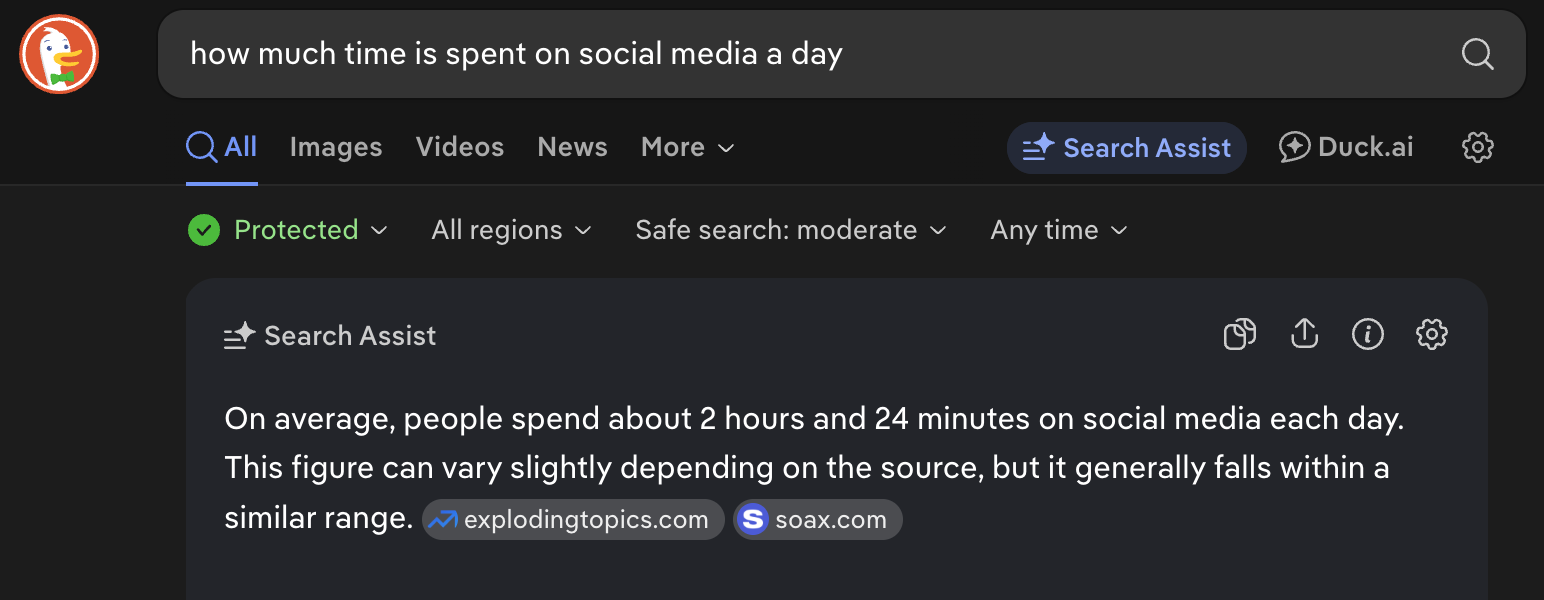
Over the last 30 days, I spent 10.26 hours per week on Substack, which is about 1.46 hours per day. According to the Internet, people spend 2.4 hours per day on social media.
I’m trying to keep my social media usage below the average and focus on bringing value to my readers.
Methodology
This is how Claude AI answered my simple question, using my Substack DM data.
